
Key Rollover Test
Click the box below, then press and hold as many keys as you can at the same time. The test shows how many keys your keyboard registers at once.
How to read your result
Your result is the highest number of keys the keyboard reported at the same time. Hold keys spread across the keyboard, for example A, S, D, F, J, K, L and the Space bar, because some keyboards drop keys only in certain combinations.
| Max rollover | What it means |
|---|---|
| 2 to 5 keys | Limited rollover. Common on office and laptop keyboards. Fast games may miss some key combinations. |
| 6 to 9 keys | 6-key rollover (6KRO). Enough for nearly all typing and most games. |
| 10 to 14 keys | High rollover. You are unlikely to run into missed keys. |
| 15 keys or more | N-key rollover (NKRO). Every key registers, no matter how many you hold. |
If a key doesn’t show up while others are held, that is ghosting or blocking. Some keyboards switch NKRO on or off with a key combination or in their software, so check the manual if your result is lower than advertised.
What is the Key Rollover?
Key rollover is a feature in computer keyboards. It allows the keyboard to register many simultaneous key presses. All this without experiencing ghosting or blocking.
In other words, when you press many keys at the same time, it recognizes all the keystrokes.
Types of Key Rollover
There are different types of N-key rollover, including:
2-Key Rollover
This is the lowest level of N-key rollover. It only allows the usage of two keys at the same time without ghosting.
6-Key Rollover
This allows the usage of up to six keys at the same time without ghosting. It’s also called “6KRO.”
Full N-key rollover
This is the highest level of N-key rollover. Every key registers correctly, even when you press all of them together, with no ghosting or blocking.
How does it work?
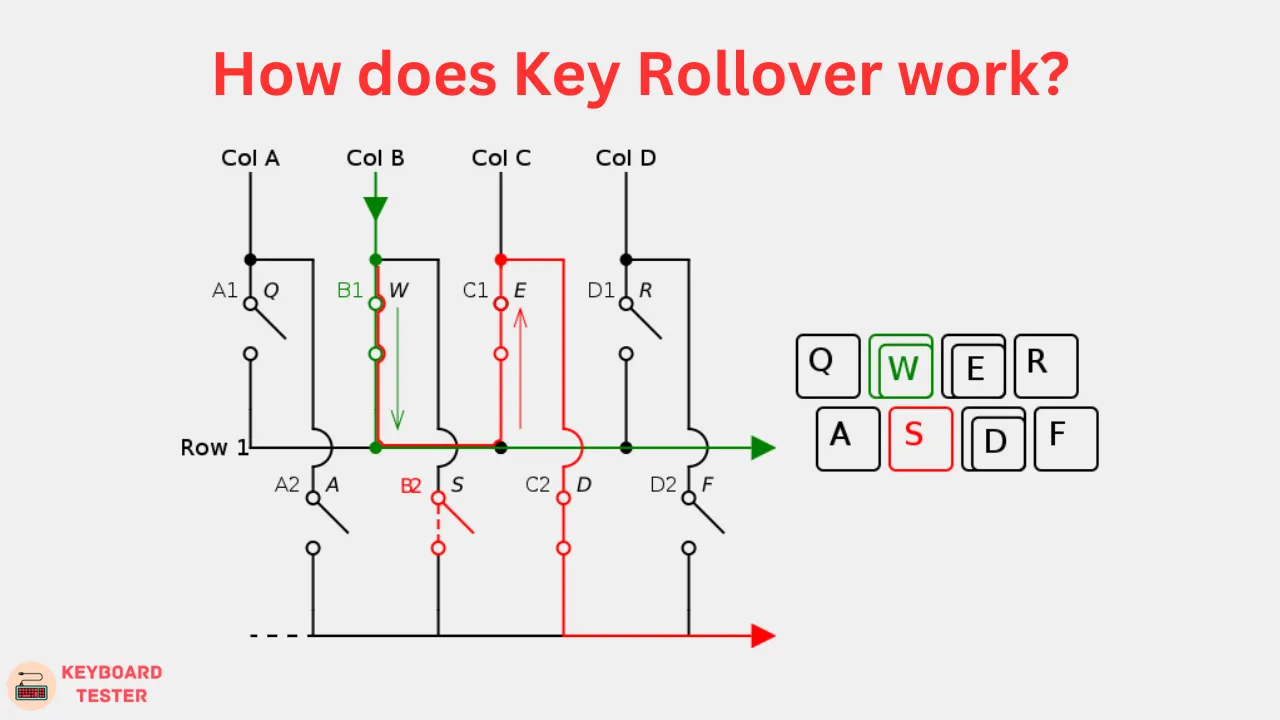
Most keyboards wire their keys in a matrix of rows and columns, and the keyboard scans that matrix to see which keys are down. Pressing certain combinations in a simple matrix can confuse the scan. That is how ghosting and blocking happen.
Keyboards with full N-key rollover avoid this. They add a diode to each key, or they use a separate circuit for every key, so the keyboard can tell any combination of keys apart. The keyboard also has to report all those keys to the computer. Over USB it does this with a special mode that many keyboards let you switch on or off. You can check what yours does with a keyboard tester.
Simpler keyboards report only a limited number of keys at once, often six. They may drop extra keys when you press many together.
How do I test my keyboard for N-key rollover?
You can take our key rollover test to test your keyboard for N-key rollover.
With the program running, press several keys together to check if they all register on the screen. If you have all the keys registered, then your keyboard has N-key rollover capability.
Benefits of N-key rollover
Accurate input: With N-key rollover, you can press many keys at once and have them all registered. This is particularly useful in a gaming keyboard. There you may need to execute frequent commands at once.
Increased functionality: N-key rollover allows for more complex keyboard shortcuts and macros. This is because you can simultaneously press various keys to create a single command or function.
Faster typing: With N-key rollover, you can type faster and with more efficiency. This is because you can type with more fingers and use more complex key combinations. No worrying about ghosting or blocking.
Why is N-key Rollover Important?
N-key rollover allows a keyboard to register several key presses altogether. No matter the number of keys used. Here are some reasons why N-key rollover is important:
Response time: Gamers need quick response time from their keyboard. This will provide precise control over their actions in games. N-key rollover allows for fast, simultaneous key presses, providing a better response time.
Accuracy: In fast-paced games like Counter-Strike 2, accuracy is essential. N-key rollover ensures registration of all the keys used together. It helps gamers perform better.
Anti-ghosting: Ghosting is a common issue with traditional keyboards. Here certain key combinations do not register.
The anti-ghosting feature enables N-key rollover to prevent this issue. It allows gamers to execute complex moves without any input delay.
Examples of Keyboards with N-key Rollover
Gaming Keyboards: Most gaming keyboards from brands such as Razer, Logitech, Corsair and SteelSeries advertise N-key rollover or anti-ghosting. Check the specification of the exact model, because some cheaper models offer only 6-key rollover.
Typing Keyboards: If you use your keyboard mainly for typing, a mechanical keyboard with N-key rollover is a good choice. Brands such as Keychron, Leopold and Varmilo offer models with it.
Multi-Purpose Keyboards: A keyboard that handles both gaming and typing works well for most people. Many Keychron and Ducky models fit here. Read reviews and specifications first, since features differ between versions of the same keyboard.
Frequently Asked Questions (FAQs)
Q1. What is an N-key rollover on a keyboard?
Ans: N-key rollover (NKRO) is a feature found in some keyboards. It allows the usage of many keys registered at once. This means that pressing a large number of keys at once allows for recognition by the computer.
Q2. How do I know if my keyboard is NKRO?
Ans: You can check if your keyboard is NKRO (N-key rollover) by pressing several keys at the same time. Then verify the registration of your computer.
Recognition of all the keys classifies your keyboard as likely an NKRO keyboard. Refering to the manufacturer’s specifications may also help. This will confirm if your keyboard has NKRO functionality.